| Lesson 4 | Information Architecture |
| Objective | Explain how Information Architecture is used to Organize and Design Knowledge |
Explain How Information Architecture Is Used to Organize and Design Knowledge
Information architecture is one of the most important planning disciplines in website models because it determines how knowledge is organized, labeled, navigated, searched, and understood. A website may have attractive design, strong branding, and valuable content, but if users cannot predict where information belongs or how to move through it, the overall experience breaks down. In that sense, information architecture is not decoration. It is the structural logic that helps users make sense of digital environments.
In older web discussions, information architecture was sometimes described only as a way to arrange pages or build menus. That explanation is directionally useful, but it is too narrow for modern digital products. In 2026, information architecture applies not only to websites, but also to web applications, intranets, portals, knowledge bases, learning systems, documentation hubs, e-commerce catalogs, and content-rich publishing platforms. It supports the design of meaning, not merely the placement of links.
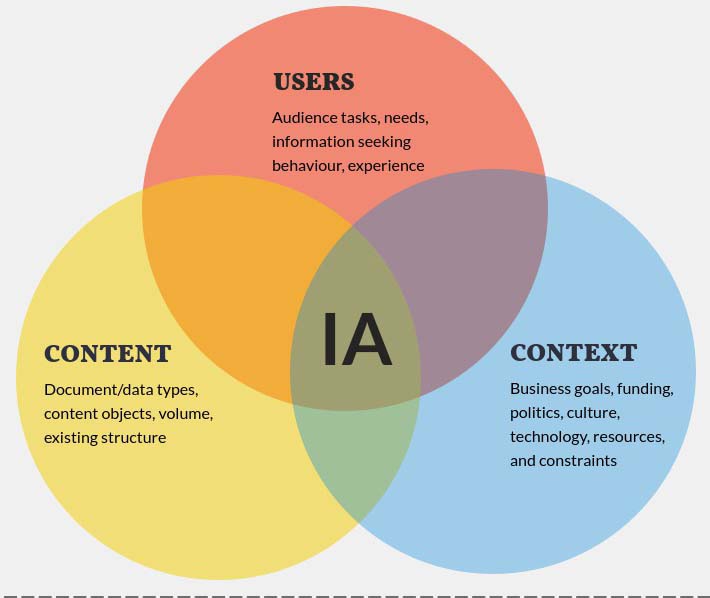
Within website models, information architecture helps connect three essential concerns: users, context, and content. Users bring goals, vocabulary, habits, and expectations. Context includes business goals, governance, technology constraints, and content strategy. Content includes the actual information objects being organized, such as articles, products, categories, images, forms, tools, documents, and media assets. A useful architecture emerges only when those three elements are considered together rather than in isolation.
This lesson explains how information architecture is used to organize and design knowledge by examining its role in website models and by focusing on five major IA topics: organization systems, labeling systems, navigation systems, search systems, and user research methods. Together, these areas explain why information architecture is foundational to effective digital structure.
In older web discussions, information architecture was sometimes described only as a way to arrange pages or build menus. That explanation is directionally useful, but it is too narrow for modern digital products. In 2026, information architecture applies not only to websites, but also to web applications, intranets, portals, knowledge bases, learning systems, documentation hubs, e-commerce catalogs, and content-rich publishing platforms. It supports the design of meaning, not merely the placement of links.
Within website models, information architecture helps connect three essential concerns: users, context, and content. Users bring goals, vocabulary, habits, and expectations. Context includes business goals, governance, technology constraints, and content strategy. Content includes the actual information objects being organized, such as articles, products, categories, images, forms, tools, documents, and media assets. A useful architecture emerges only when those three elements are considered together rather than in isolation.
This lesson explains how information architecture is used to organize and design knowledge by examining its role in website models and by focusing on five major IA topics: organization systems, labeling systems, navigation systems, search systems, and user research methods. Together, these areas explain why information architecture is foundational to effective digital structure.
Information Architecture in Website Models
Information architecture plays a central role in website models because it translates abstract goals into a usable structure. In many web-design frameworks, visual signs and metaphors help establish look and feel, while software provides the interactive engine that delivers features and data. Between those layers sits information architecture: the structural layer that decides how knowledge is grouped, how categories relate to one another, what labels users will see, and which pathways allow people to move confidently through the site.
This is why information architecture should be understood as a model of knowledge organization rather than merely a navigation exercise. A website model describes more than pages on a server. It describes how a digital environment presents concepts, relationships, and tasks to real people. If the architecture is weak, users may misinterpret the meaning of categories, overlook important pages, fail to complete workflows, or lose trust in the site. If the architecture is strong, users can predict where information belongs, understand available options, and complete tasks with less friction.
In practical terms, the role of information architecture in website models includes:
This is why information architecture should be understood as a model of knowledge organization rather than merely a navigation exercise. A website model describes more than pages on a server. It describes how a digital environment presents concepts, relationships, and tasks to real people. If the architecture is weak, users may misinterpret the meaning of categories, overlook important pages, fail to complete workflows, or lose trust in the site. If the architecture is strong, users can predict where information belongs, understand available options, and complete tasks with less friction.
In practical terms, the role of information architecture in website models includes:
- defining the structural relationship between main topics and supporting topics,
- clarifying the difference between global, sectional, and local content,
- establishing stable terminology for categories and labels,
- supporting navigation paths across hierarchical or cross-linked structures,
- enabling search systems through metadata, indexing, and filters,
- and aligning all of the above with user intent and business goals.
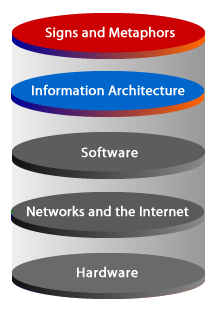
| Signs and Metaphors | Images, icons, color, interface cues, and visual comparisons that help users interpret meaning. |
| Information Architecture | Organization, labeling, navigation, search structure, metadata, and content relationships. |
| Software Layer | Applications, programming logic, databases, content services, and interface behavior that make the first two layers functional. |
Organization Systems: Structuring Knowledge
The first major topic in information architecture is the organization system. This refers to how content is grouped, categorized, sequenced, and related. Organization systems are essential because a website is not just a collection of pages. It is a structured body of knowledge that needs internal order.
Several common organization models appear in digital products:
A useful example is a book. A book has chapters, sections, paragraphs, footnotes, and an index. That is a form of information architecture. A phone directory also demonstrates architecture by grouping entries alphabetically or by service category. A restaurant directory might be organized by cuisine, neighborhood, or price range. These examples matter because they show that information architecture exists wherever information is compiled for access and use.
On the Web, the challenge is greater because digital structures are more flexible than paper structures. A paper document usually expects linear reading. A website must support linear and non-linear access at the same time. Users may browse, filter, search, jump directly from search engines, or enter through a deep internal page instead of a homepage. Organization systems must therefore support multiple entry points while still preserving coherence.
Several common organization models appear in digital products:
- Hierarchical structures group content from broad categories into narrower subcategories.
- Sequential structures guide users step by step, as in lessons, onboarding flows, or multi-stage forms.
- Matrix structures allow users to move across multiple dimensions, such as topic, audience, or product type.
- Faceted structures let users filter information dynamically by attributes such as date, price, role, difficulty, format, or category.
A useful example is a book. A book has chapters, sections, paragraphs, footnotes, and an index. That is a form of information architecture. A phone directory also demonstrates architecture by grouping entries alphabetically or by service category. A restaurant directory might be organized by cuisine, neighborhood, or price range. These examples matter because they show that information architecture exists wherever information is compiled for access and use.
On the Web, the challenge is greater because digital structures are more flexible than paper structures. A paper document usually expects linear reading. A website must support linear and non-linear access at the same time. Users may browse, filter, search, jump directly from search engines, or enter through a deep internal page instead of a homepage. Organization systems must therefore support multiple entry points while still preserving coherence.
Labeling Systems: Naming What Users See
The second major topic is the labeling system. Labels are the words and phrases used to represent categories, sections, links, menu items, buttons, filters, and headings. Labeling may appear simple, but it is one of the most difficult parts of information architecture because language must match user expectations without oversimplifying the content.
A label acts as a promise. When users click a navigation item called Pricing, Documentation, Support, Resources, or Account Settings, they form an expectation about what they will find. If the label is vague, misleading, inconsistent, or overly internal to the organization, users become disoriented.
Good labeling systems are:
Labeling also has a strong relationship to SEO and content discoverability. In publishing environments, the labels used in categories, titles, taxonomy structures, and navigation menus influence how search engines interpret site structure and how users decide whether a page is relevant. But the primary purpose of IA labels is still user comprehension. Labels should help users understand what the information means and where it belongs.
A label acts as a promise. When users click a navigation item called Pricing, Documentation, Support, Resources, or Account Settings, they form an expectation about what they will find. If the label is vague, misleading, inconsistent, or overly internal to the organization, users become disoriented.
Good labeling systems are:
- clear enough to support quick understanding,
- consistent across the site,
- meaningful to users rather than only to internal staff,
- scannable in menus, headings, and sidebars,
- and differentiated enough that users can distinguish related categories.
Labeling also has a strong relationship to SEO and content discoverability. In publishing environments, the labels used in categories, titles, taxonomy structures, and navigation menus influence how search engines interpret site structure and how users decide whether a page is relevant. But the primary purpose of IA labels is still user comprehension. Labels should help users understand what the information means and where it belongs.
Navigation Systems: Supporting Movement and Orientation
Search Systems: Supporting Findability
The fourth major topic is the search system. Information architecture is often associated with browsing and hierarchy, but search is equally important because many users prefer to search rather than navigate. In large websites, knowledge bases, intranets, and product catalogs, search is often the fastest route to task completion.
However, search is not separate from IA. A search experience depends on architecture. If content is poorly categorized, inconsistently titled, weakly labeled, or missing metadata, search will also perform poorly. Good search systems rely on architectural decisions such as:
Modern search design often includes:
However, search is not separate from IA. A search experience depends on architecture. If content is poorly categorized, inconsistently titled, weakly labeled, or missing metadata, search will also perform poorly. Good search systems rely on architectural decisions such as:
- meaningful page titles and headings,
- consistent terminology,
- metadata design,
- tagging and taxonomy rules,
- relevance ranking,
- autocomplete and synonym handling,
- and faceted filters that help refine results.
Modern search design often includes:
- autocomplete suggestions,
- popular query support,
- spelling tolerance,
- filter panels,
- structured result types,
- and relevance strategies tuned to user intent.
User Research Methods for Information Architecture
The fifth major topic is user research for IA. Information architecture should not be designed only from internal assumptions. Organizations often have their own jargon, departmental boundaries, and mental models that do not match the way users actually think. Research methods help architects understand user expectations and validate whether the structure is intuitive.
Common user research methods for IA include:
In website models, user research helps prevent structural drift. Over time, sites often accumulate duplicated pages, inconsistent categories, and navigation clutter. Research provides a way to correct the architecture and realign it with the user’s mental model rather than the organization’s accumulated habits.
Common user research methods for IA include:
- Card sorting, where participants group topics or content items in ways that make sense to them.
- Tree testing, where users attempt to find information in a proposed hierarchy without full visual design.
- User interviews, which reveal goals, vocabulary, frustrations, and task context.
- Task analysis, which studies what users are trying to accomplish and which information supports those tasks.
- Content audits, which evaluate the scope, overlap, quality, and condition of the existing content inventory.
In website models, user research helps prevent structural drift. Over time, sites often accumulate duplicated pages, inconsistent categories, and navigation clutter. Research provides a way to correct the architecture and realign it with the user’s mental model rather than the organization’s accumulated habits.
Information Architecture and SILO Structures
The original lesson connects information architecture to SILO structures, and this relationship is still useful when explained carefully. In a website context, a silo is a group of related pages organized around a focused topic, category, or theme. Each silo usually includes a main topic page along with subpages that expand the subject in more detail.
When used well, silo structures can strengthen both usability and topical clarity. They help users move from general topics to specific subtopics and make it easier for search engines to understand the conceptual grouping of content. But a silo should never be treated as an isolated SEO trick. It only works well when it reflects a sound underlying information architecture.
This means the process should be:
When used well, silo structures can strengthen both usability and topical clarity. They help users move from general topics to specific subtopics and make it easier for search engines to understand the conceptual grouping of content. But a silo should never be treated as an isolated SEO trick. It only works well when it reflects a sound underlying information architecture.
This means the process should be:
- identify the major themes or knowledge domains of the site,
- define the relationships among those domains,
- build meaningful categories and subcategories,
- apply clear labels and navigation pathways,
- and then reinforce those structures through internal linking and content planning.
Examples of Information Architecture in Practice
Information architecture appears in many familiar systems, not just websites.
A book uses chapters, headings, footnotes, page numbers, and an index. A phone directory uses alphabetical order, business categories, and visual distinction between sections. A retail site uses departments, product types, filters, and detail pages. A course website uses modules, lessons, prerequisites, quizzes, and supporting references. A documentation hub uses topic hierarchies, search, versioning, and cross-links.
These examples are useful because they show that information architecture is the design of access to knowledge. The medium changes, but the architectural questions remain the same:
A book uses chapters, headings, footnotes, page numbers, and an index. A phone directory uses alphabetical order, business categories, and visual distinction between sections. A retail site uses departments, product types, filters, and detail pages. A course website uses modules, lessons, prerequisites, quizzes, and supporting references. A documentation hub uses topic hierarchies, search, versioning, and cross-links.
These examples are useful because they show that information architecture is the design of access to knowledge. The medium changes, but the architectural questions remain the same:
- How is the information grouped?
- How is it named?
- How do users move through it?
- How do they search it?
- How do we know the structure matches their needs?
Outdated Approaches Versus Contemporary IA Practice
Some older approaches to website structure assumed that navigation alone was enough, or that information architecture was simply a set of menus designed after the content had already been produced. Contemporary IA practice is more rigorous. It begins earlier and works more systematically with content strategy, taxonomy, search, metadata, user research, and cross-channel consistency.
Likewise, older site models sometimes depended on rigid, linear pathways or treated every user as though they entered through the homepage. That is no longer realistic. Users may arrive from search engines, social links, internal search, bookmarks, AI-assisted retrieval, or direct deep links to internal pages. Architecture must therefore support re-entry, orientation, and cross-path navigation at every level.
Contemporary IA also recognizes that websites are not static brochure environments. They are often content systems, application interfaces, and knowledge environments with layered interactions. As a result, architecture must support both human understanding and system behavior. It must work for users, editors, search engines, and software services at the same time.
Likewise, older site models sometimes depended on rigid, linear pathways or treated every user as though they entered through the homepage. That is no longer realistic. Users may arrive from search engines, social links, internal search, bookmarks, AI-assisted retrieval, or direct deep links to internal pages. Architecture must therefore support re-entry, orientation, and cross-path navigation at every level.
Contemporary IA also recognizes that websites are not static brochure environments. They are often content systems, application interfaces, and knowledge environments with layered interactions. As a result, architecture must support both human understanding and system behavior. It must work for users, editors, search engines, and software services at the same time.
Conclusion
Information architecture is used to organize and design knowledge by creating systems that make information understandable, findable, and usable. In website models, it serves as the structural layer that connects users, context, and content. It shapes how categories are formed, how labels communicate meaning, how navigation supports movement, how search enables retrieval, and how research validates the overall structure.
A well-designed architecture does more than arrange pages. It defines how a digital environment expresses knowledge. It helps users understand where they are, what is available, and how to move toward their goals. It also helps organizations maintain coherence across growing content collections, applications, and services.
For modern websites, intranets, learning platforms, documentation hubs, and knowledge systems, information architecture remains a foundational discipline. Whether the structure is hierarchical, sequential, faceted, or hybrid, the core principle remains the same: information must be organized in ways that make sense to the people who use it.
In the next lesson, web navigation can be examined more directly, since navigation is one of the most visible ways information architecture is expressed on a web page.
A well-designed architecture does more than arrange pages. It defines how a digital environment expresses knowledge. It helps users understand where they are, what is available, and how to move toward their goals. It also helps organizations maintain coherence across growing content collections, applications, and services.
For modern websites, intranets, learning platforms, documentation hubs, and knowledge systems, information architecture remains a foundational discipline. Whether the structure is hierarchical, sequential, faceted, or hybrid, the core principle remains the same: information must be organized in ways that make sense to the people who use it.
In the next lesson, web navigation can be examined more directly, since navigation is one of the most visible ways information architecture is expressed on a web page.
Information Architecture Differences - Exercise
Click the Exercise link below to apply your understanding of information architecture.
Information Architecture Differences - Exercise
In the next lesson, you will learn how web navigation applies information architecture to access information on a web page.
Information Architecture Differences - Exercise
In the next lesson, you will learn how web navigation applies information architecture to access information on a web page.