| Lesson 7 | The Web Interaction Model and Web-based Business Applications |
| Objective | Explain how Web-based business applications are supported by the Web Interaction Model. |
Web Interaction Model and Web-Based Business Applications
From Conceptual Model to Operational System
Modern Web-based business applications—whether for stock trading, e-commerce, CRM, analytics, or project management—are not single programs. They are coordinated systems built across multiple layers of interaction. A request initiated by a user must travel through interface logic, application services, secure networks, and hardware infrastructure before returning as meaningful information.
The Web Interaction Model provides a structured way to understand this orchestration. In its modern equivalent, the five layers can be interpreted as:
- Signs and Metaphors – Visual cues and interaction patterns.
- Information Architecture – Structural organization of content and navigation.
- Software – Application logic, APIs, and databases.
- Networks and the Internet – Secure transmission via HTTPS and TCP/IP.
- Hardware – Physical infrastructure executing computation and storage.
Applying the Model: The Stock Quote Application
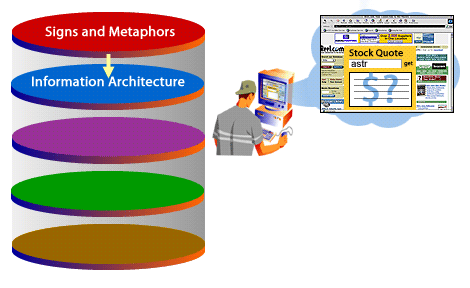
Consider a stock quote application. A user enters a ticker symbol into a search field. This seemingly simple act activates all five layers simultaneously.
Step 1: User Interaction (Signs and Metaphors)
The interface presents a text field and a “Get Quote” action. The search box acts as a metaphor for querying a financial database. Clear labeling, placement, and button design signal what action the user should take.
This layer focuses on usability, accessibility, and clarity. Modern best practices include semantic HTML, ARIA attributes, keyboard accessibility, and visual consistency.
Step 2: Application Logic and Data Services (Software)
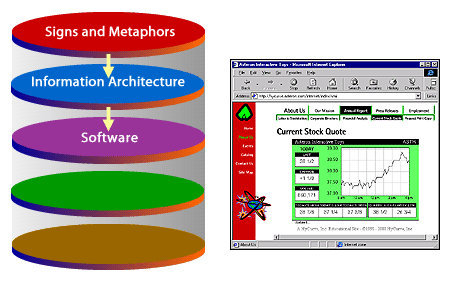
In the legacy example, a Java Applet generated the stock chart. Today, this functionality would typically be implemented using JavaScript frameworks, REST APIs, and server-side application services.
Behind the interface:
- The browser sends an HTTPS request.
- The application server processes the query.
- A database (DBMS) retrieves historical stock data.
- A charting library renders results dynamically.
Modern systems may also incorporate:
- Cloud-hosted databases
- Microservices architecture
- API gateways
- Edge caching
- Authentication layers
Step 3: Secure Transmission (Networks and the Internet)
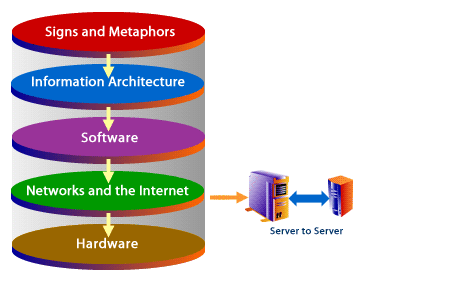
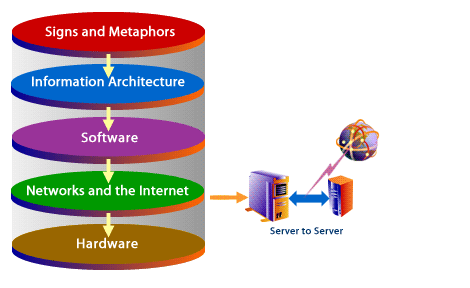
The request travels over encrypted HTTPS (TLS). DNS resolves the domain name. Routers and switches forward packets across regional and global networks.
High-availability infrastructures may include:
- Load balancers
- Content Delivery Networks (CDNs)
- Redundant server clusters
- Cloud regions with failover support
This layer ensures reliability, speed, and security.
Step 4: Hardware Execution
Hardware enables every computational step. On the client side, the user’s device renders the graph. On the server side, processors execute queries and application logic. Data center infrastructure supports storage arrays, virtualization, and network routing.
Without hardware, software cannot execute, and networks cannot transmit requests.
Step 5: Response Rendering and Meaning
The response travels back to the browser. Software interprets the returned data. Information Architecture structures it into a readable chart. Signs and Metaphors—axes, color coding, labels—convert raw data into meaningful insight.
The user perceives the result as a coherent financial visualization, but beneath it lies a layered orchestration of systems.
Web Network Data Science
Web-Based Business Applications at Scale
Stock quotes are only one example. Modern Web-based business applications include:
- Project management platforms
- Customer relationship management (CRM) systems
- Time and expense reporting systems
- E-commerce marketplaces
- Enterprise resource planning (ERP) portals
- Analytics dashboards
Each relies on the same layered interaction model:
- User actions initiate requests.
- Software processes business logic.
- Databases store persistent state.
- Networks transmit securely.
- Hardware executes computation.
AI and the Experience-First Web
Today’s Web Interaction Model must also account for AI systems and machine agents. Business applications are no longer consumed only by human users.
Modern design incorporates:
- Structured data for machine readability
- API-first architectures
- Accessibility compliance
- Performance optimization
- Clear semantic markup
An experience-first approach ensures that both humans and AI agents can interpret, retrieve, and process information efficiently.
Security and Compliance in Business Applications
Unlike early Web applications, modern systems must integrate:
- HTTPS encryption
- Role-based access control
- Multi-factor authentication
- Audit logging
- Regulatory compliance (e.g., financial reporting standards)
These elements extend the Web Interaction Model beyond usability into governance and trust.
Conclusion
Web-based business applications are supported by the Web Interaction Model through coordinated interaction across five essential layers. A simple request—such as retrieving a stock quote—activates interface design, structured information architecture, application software, secure network transmission, and hardware execution.
Understanding this layered support structure allows developers, architects, and business leaders to design systems that are scalable, secure, accessible, and optimized for both human and AI-driven interaction.
In the next lesson, you will review and synthesize the key concepts from this module.