| Lesson 6 | Software |
| Objective | Describe the Software Layer and its Components in the modern web stack |
Software Layer and Its Components in the Modern Web Stack
The third layer of the Web Interaction Model is the Software Layer. This layer includes the code, runtimes, frameworks, databases, delivery platforms, and development tools that make digital experiences work. If Signs and Metaphors shape what users perceive, and Information Architecture shapes how content is organized, the Software Layer provides the execution model that renders interfaces, processes requests, stores data, secures transactions, and coordinates the behavior of the entire site or application.
In modern web development, software is no longer limited to a single web server generating HTML pages. A contemporary application may combine browser-based JavaScript, server-side rendering, APIs, edge functions, managed databases, object storage, authentication services, observability tooling, background jobs, CI/CD pipelines, and cloud infrastructure. These parts work together to turn design intent into an operational digital product.
This lesson explains the major components of the Software Layer, how they support the upper layers of the Web Interaction Model, and how they integrate with modern cloud platforms such as Amazon Web Services (AWS), Google Cloud Platform (GCP), and Microsoft Azure.
In modern web development, software is no longer limited to a single web server generating HTML pages. A contemporary application may combine browser-based JavaScript, server-side rendering, APIs, edge functions, managed databases, object storage, authentication services, observability tooling, background jobs, CI/CD pipelines, and cloud infrastructure. These parts work together to turn design intent into an operational digital product.
This lesson explains the major components of the Software Layer, how they support the upper layers of the Web Interaction Model, and how they integrate with modern cloud platforms such as Amazon Web Services (AWS), Google Cloud Platform (GCP), and Microsoft Azure.
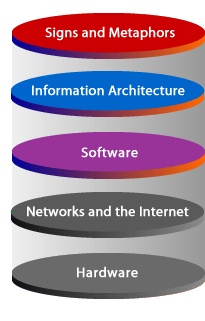
| Signs and Metaphors | Signs are the visible and audible cues that communicate meaning to users. Metaphors help users infer purpose, action, and structure through familiar interface patterns such as cards, menus, buttons, dashboards, and navigation icons. |
| Information Architecture | Information Architecture organizes content, categories, labels, and navigation pathways so users can locate, interpret, and move through a site or application efficiently. |
| Software | The Software Layer includes the programs, services, frameworks, APIs, data stores, and platform tooling that render interfaces, execute logic, manage content, store data, and connect users to functionality. |
| Networks and the Internet | Networks transport requests and responses between clients, edge locations, origin servers, APIs, databases, and cloud services using internet protocols, DNS, TLS, routing, and content delivery systems. |
| Hardware | Hardware includes the compute, storage, and device resources that support digital interaction, whether on local devices, in data centers, or across public cloud and hybrid infrastructure. |
Why the Software Layer Matters
The Software Layer is where a planned experience becomes a working system. It translates page structure, interface design, and business requirements into executable behavior. When a user loads a product page, submits a form, signs in, watches a video, receives personalized recommendations, or saves data to an account, software is coordinating those actions.
This layer also determines many non-visual qualities of a site or application, including performance, reliability, accessibility support, security posture, scalability, maintainability, and release velocity. A visually attractive interface can still fail if the underlying software is fragile, slow, insecure, or difficult to evolve.
That is why modern teams think of software not just as “code,” but as a broader operational system involving source control, testing, build pipelines, deployment targets, telemetry, rollback strategy, secrets management, caching, and service integration.
This layer also determines many non-visual qualities of a site or application, including performance, reliability, accessibility support, security posture, scalability, maintainability, and release velocity. A visually attractive interface can still fail if the underlying software is fragile, slow, insecure, or difficult to evolve.
That is why modern teams think of software not just as “code,” but as a broader operational system involving source control, testing, build pipelines, deployment targets, telemetry, rollback strategy, secrets management, caching, and service integration.
Interaction Models and Software-Supported Flow
Interaction models help describe how users move through a digital system. They are closely related to Information Architecture, but they become operational only when software implements them.
For example, an interaction model may describe:
In that sense, interaction models are not separate from software processes; they depend on them. Software makes task flow visible, measurable, and repeatable.
For example, an interaction model may describe:
- how a user moves from a landing page to deeper content
- how search, filtering, and navigation behave
- how forms respond to input and validation
- how personalized recommendations appear
- how state is preserved across sessions or devices
In that sense, interaction models are not separate from software processes; they depend on them. Software makes task flow visible, measurable, and repeatable.
Core Components of the Software Layer
The Software Layer can be understood through several practical categories. These are not rigid or mutually exclusive categories, but they help explain how modern web systems are assembled.
- Languages and markup technologies
- Frameworks and application runtimes
- Databases and storage services
- Platforms, tooling, and delivery systems
1) Languages and Markup Technologies
Languages define how digital behavior is described and executed. HTML provides document structure. CSS controls presentation and responsive layout. JavaScript and TypeScript handle interactivity, state transitions, and client/server logic in many modern stacks. Other backend languages such as Java, C#, Python, PHP, Go, and Rust are commonly used to build APIs, services, content systems, automation pipelines, and performance-sensitive workloads.
Languages support the upper layers of the Web Interaction Model in several ways. HTML semantics, ARIA roles, and structured content support Information Architecture. CSS and JavaScript support signs, motion, feedback, and visual interaction. Backend languages support data processing, authentication, business rules, and content generation. Together, these technologies make the interface understandable and functional.
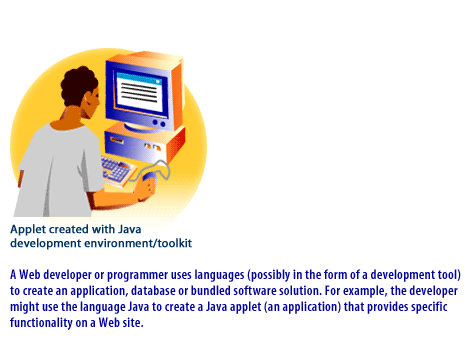
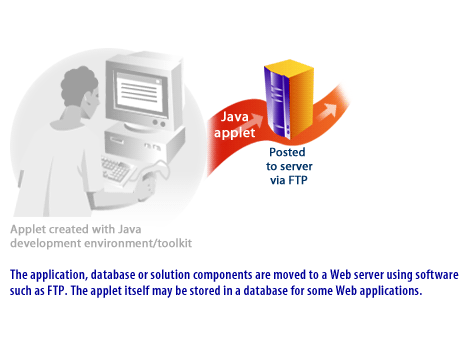
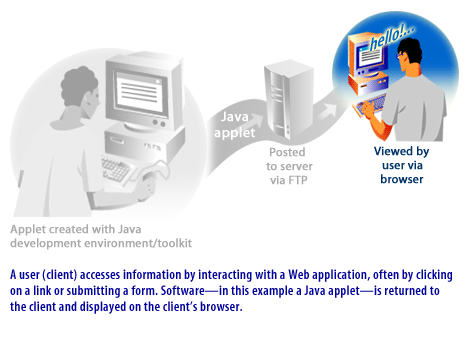
A useful modernization point is that browsers no longer rely on plugin-based client software such as Java applets. That model has been replaced by standards-based web applications, JavaScript frameworks, Web APIs, WebAssembly in selected cases, and increasingly server-first rendering strategies.
Languages support the upper layers of the Web Interaction Model in several ways. HTML semantics, ARIA roles, and structured content support Information Architecture. CSS and JavaScript support signs, motion, feedback, and visual interaction. Backend languages support data processing, authentication, business rules, and content generation. Together, these technologies make the interface understandable and functional.
A useful modernization point is that browsers no longer rely on plugin-based client software such as Java applets. That model has been replaced by standards-based web applications, JavaScript frameworks, Web APIs, WebAssembly in selected cases, and increasingly server-first rendering strategies.
2) Frameworks and Application Runtimes
A modern website is often built with a framework rather than with isolated pages. Frameworks provide routing, rendering strategies, component systems, asset pipelines, API integration, and developer ergonomics. In the contemporary stack, examples include React-based meta-frameworks such as Next.js, Vue-based frameworks such as Nuxt, and other full-stack tools that combine server-side rendering, static generation, client interactivity, and API handling in one development model.
Application runtimes determine where and how code executes. Some code runs in the browser. Some runs on a Node.js server. Some executes in serverless functions or at the edge for low-latency personalization, redirects, or lightweight request handling. This is one of the biggest differences between older web stacks and modern ones: software can now execute across multiple layers of the delivery path rather than on one origin server alone.
This architecture helps teams optimize performance and scale. A cacheable marketing page may be statically generated, a personalized dashboard may be server-rendered, and a small request transformation may execute in an edge runtime closer to the user.
Application runtimes determine where and how code executes. Some code runs in the browser. Some runs on a Node.js server. Some executes in serverless functions or at the edge for low-latency personalization, redirects, or lightweight request handling. This is one of the biggest differences between older web stacks and modern ones: software can now execute across multiple layers of the delivery path rather than on one origin server alone.
This architecture helps teams optimize performance and scale. A cacheable marketing page may be statically generated, a personalized dashboard may be server-rendered, and a small request transformation may execute in an edge runtime closer to the user.
3) Databases and Storage Services
Most modern digital systems depend on persistent data. Databases store application records such as users, products, orders, content, permissions, events, and configuration. Depending on the use case, teams may use relational databases, document databases, key-value systems, search indexes, or specialized services for analytics, vector search, or event streaming.
Storage extends beyond databases. Media assets, documents, backups, logs, and static files are commonly stored in object storage systems rather than directly on application servers. This separation improves scalability, resilience, and deployment flexibility.
The important conceptual point is that the Software Layer is responsible not only for presenting information, but also for creating, validating, retrieving, securing, and updating it.
Storage extends beyond databases. Media assets, documents, backups, logs, and static files are commonly stored in object storage systems rather than directly on application servers. This separation improves scalability, resilience, and deployment flexibility.
The important conceptual point is that the Software Layer is responsible not only for presenting information, but also for creating, validating, retrieving, securing, and updating it.
4) Platforms, Tooling, and Delivery Systems
Modern software development also depends on platform services and operational tooling. Source control systems manage collaboration. CI/CD pipelines build, test, and deploy code. Observability stacks collect logs, metrics, traces, and alerts. Identity platforms handle authentication and authorization. Secrets managers protect credentials. CDN and edge services improve geographic performance. Container platforms package and run workloads consistently across environments.
These capabilities are part of the Software Layer because they determine how software reaches production and how safely it operates once deployed.
These capabilities are part of the Software Layer because they determine how software reaches production and how safely it operates once deployed.
From Development to Production: The Modern Software Process
A useful way to understand the Software Layer is as a lifecycle:
- Design — model the experience, content structure, data needs, and user tasks
- Build — implement components, APIs, services, and database schemas
- Test — validate correctness, accessibility, performance, and security
- Deploy — ship changes through automated pipelines
- Operate — monitor, scale, patch, and improve the system in production
Team Process and Individual Practice
Team Software Process
Software is usually created through collaboration among developers, designers, content specialists, QA engineers, DevOps engineers, security teams, and stakeholders. A team process helps coordinate requirements, architecture, release sequencing, testing, and maintenance. In practice, this means using issue tracking, sprint planning, code review, automated checks, deployment controls, and production monitoring rather than relying only on individual effort.
Personal Software Process
Individual discipline still matters. A personal process may include estimating work, breaking problems into smaller tasks, tracking defects, testing incrementally, documenting decisions, and reviewing outcomes after implementation. These habits improve code quality and make collaboration easier. In modern environments, personal practice also includes version control hygiene, branch discipline, local testing, and secure handling of secrets and configuration.
How the Software Layer Integrates with AWS, Google Cloud, and Azure
The Software Layer increasingly runs on cloud platforms rather than on one self-managed web server.
AWS supports this layer through services for static and dynamic delivery, serverless execution, containers, managed databases, object storage, identity, monitoring, and global distribution. A modern site might use object storage for assets, a CDN for delivery, serverless functions for backend logic, and containerized services for APIs or long-running workloads.
Google Cloud Platform supports web applications through managed compute, Cloud Run-style container delivery, databases, architecture guidance, networking, observability, and secure application patterns. Teams often combine managed services to reduce infrastructure overhead while keeping the architecture resilient and scalable.
Microsoft Azure supports the Software Layer through App Service, Container Apps, managed databases, identity integration, architecture guidance, and enterprise-friendly operational tooling. This is especially common in organizations that already depend on Microsoft development and identity ecosystems.
The platform names differ, but the pattern is similar across all three providers: software is broken into services, delivered through managed infrastructure, monitored continuously, and scaled elastically based on demand.
AWS supports this layer through services for static and dynamic delivery, serverless execution, containers, managed databases, object storage, identity, monitoring, and global distribution. A modern site might use object storage for assets, a CDN for delivery, serverless functions for backend logic, and containerized services for APIs or long-running workloads.
Google Cloud Platform supports web applications through managed compute, Cloud Run-style container delivery, databases, architecture guidance, networking, observability, and secure application patterns. Teams often combine managed services to reduce infrastructure overhead while keeping the architecture resilient and scalable.
Microsoft Azure supports the Software Layer through App Service, Container Apps, managed databases, identity integration, architecture guidance, and enterprise-friendly operational tooling. This is especially common in organizations that already depend on Microsoft development and identity ecosystems.
The platform names differ, but the pattern is similar across all three providers: software is broken into services, delivered through managed infrastructure, monitored continuously, and scaled elastically based on demand.
Modern Tooling for Standard Web Development Platforms
A contemporary development platform typically includes:
- an editor or IDE
- source control with Git-based workflows
- package and dependency management
- framework tooling for build and routing
- test automation
- CI/CD automation
- environment and secret management
- logging, metrics, and tracing
- deployment targets for edge, serverless, containers, or managed app hosting
How Software Supports the Upper Layers of the Web Interaction Model
The Software Layer does not exist in isolation. It supports everything above it:
- Signs and Metaphors: software renders interface components, icons, animation, feedback states, and interaction behavior
- Information Architecture: software powers menus, breadcrumbs, search, routing, taxonomy delivery, metadata, and related-content logic
- User Flow: software connects pages, forms, permissions, APIs, and stored state into coherent task sequences
Conclusion
The Software Layer is the execution engine of the modern web stack. It includes the languages, frameworks, runtimes, databases, storage systems, operational platforms, and cloud services that transform design intent into real digital behavior.
In older web models, software was often discussed as if it lived mainly on a web server and delivered pages to a browser. In the modern stack, software is distributed across browsers, servers, APIs, edge runtimes, managed databases, CI/CD pipelines, and cloud platforms. Understanding this broader picture helps explain how modern websites and applications become fast, scalable, secure, and maintainable.
In the next lesson, you can build on this foundation by examining how applications expose specific functionality to users and how those software components participate in larger interaction flows.
In older web models, software was often discussed as if it lived mainly on a web server and delivered pages to a browser. In the modern stack, software is distributed across browsers, servers, APIs, edge runtimes, managed databases, CI/CD pipelines, and cloud platforms. Understanding this broader picture helps explain how modern websites and applications become fast, scalable, secure, and maintainable.
In the next lesson, you can build on this foundation by examining how applications expose specific functionality to users and how those software components participate in larger interaction flows.