| Lesson 7 | Storyboard development |
| Objective | Develop a storyboard to outline your plans |
Develop a Storyboard to Outline Your Plans
Whether you are building a site from the ground up, creating a site for an existing company, or planning a significant addition to an existing platform, storyboarding should precede coding and implementation. Storyboarding is the process of creating an overall plan that shows the structure, sequence, and connections of each logical step — as well as the details of how each part of the site maps to your business goals.
In the early 2000s, an e-commerce storyboard was a paper sketch or PowerPoint slide showing screen sequences, navigation links, and basic checkout flows. The focus was on technical feasibility in a dial-up, low-trust environment where the primary challenge was simply getting users to complete a purchase. By 2026, storyboards have become far more sophisticated — integrated into UX/UI design, video ad production, AI-generated content, and full customer journey mapping across omnichannel touchpoints. The scope has expanded from "what the page looks like" to "how the user feels and flows across every touchpoint from awareness through post-purchase advocacy."
A complete e-commerce storyboard addresses two distinct concerns:
In the early 2000s, an e-commerce storyboard was a paper sketch or PowerPoint slide showing screen sequences, navigation links, and basic checkout flows. The focus was on technical feasibility in a dial-up, low-trust environment where the primary challenge was simply getting users to complete a purchase. By 2026, storyboards have become far more sophisticated — integrated into UX/UI design, video ad production, AI-generated content, and full customer journey mapping across omnichannel touchpoints. The scope has expanded from "what the page looks like" to "how the user feels and flows across every touchpoint from awareness through post-purchase advocacy."
A complete e-commerce storyboard addresses two distinct concerns:
- Front-end plans — the structure and navigation of the pages the customer sees: how pages connect, in what order users move through them, and how the navigation system supports the user's goals at each step
- Back-end concerns — the servers, databases, APIs, and application logic required to make the front end functional: what infrastructure is needed, how data flows, and which server-side technologies will implement the required features
Front-End Storyboard Types
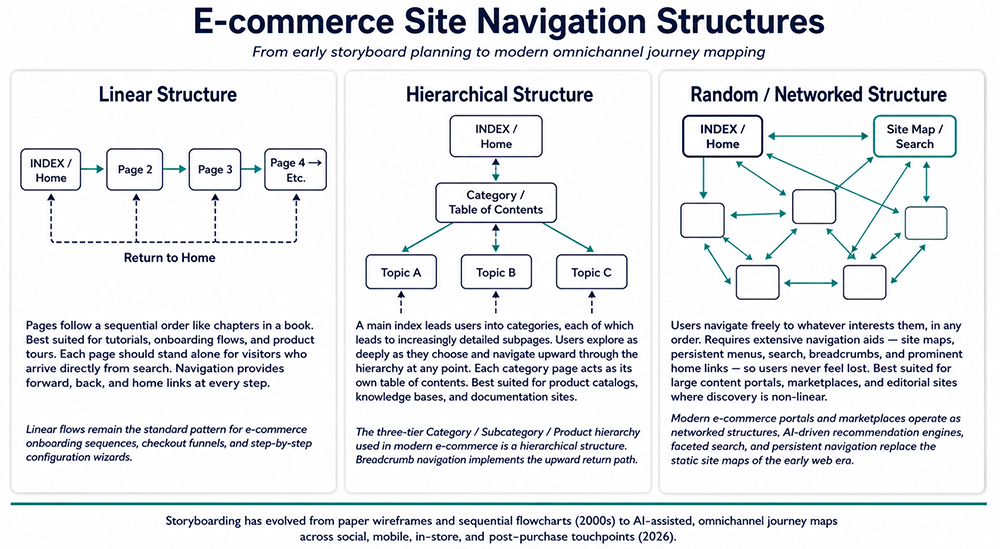
Three common navigation structures are used in e-commerce storyboarding. The structure you choose determines how users move through the site and what navigation infrastructure must be built to support them. Most e-commerce sites combine more than one structure — a hierarchical product catalog with a linear checkout embedded within it, for example.
1. Linear Structure
In a linear structure, the introductory page is followed sequentially by pages 1, 2, 3, and so on — like chapters in a book. Navigation links allow users to go back, forward, and home. Each page should stand alone for visitors who arrive directly from a search engine rather than from the beginning of the sequence.
Best suited for: tutorials, onboarding flows, product tours, step-by-step setup wizards, and checkout funnels. The e-commerce checkout process — cart review → shipping address → payment → order confirmation — is a linear structure embedded within a larger hierarchical or networked site. The user must complete each step in order, and the interface reflects that constraint.
Modern context: Linear flows remain the standard pattern for e-commerce checkout sequences, guided onboarding experiences, and video ad sequences. Multi-step product configurators, subscription signup flows, and progressive-disclosure forms all apply linear storyboard logic. The linear structure is also used in email marketing sequences — a welcome series that delivers content in a defined order over time follows the same structural principle as a linear website.
Best suited for: tutorials, onboarding flows, product tours, step-by-step setup wizards, and checkout funnels. The e-commerce checkout process — cart review → shipping address → payment → order confirmation — is a linear structure embedded within a larger hierarchical or networked site. The user must complete each step in order, and the interface reflects that constraint.
Modern context: Linear flows remain the standard pattern for e-commerce checkout sequences, guided onboarding experiences, and video ad sequences. Multi-step product configurators, subscription signup flows, and progressive-disclosure forms all apply linear storyboard logic. The linear structure is also used in email marketing sequences — a welcome series that delivers content in a defined order over time follows the same structural principle as a linear website.
2. Hierarchical Structure
In a hierarchical structure, a main index page leads users into categories, each of which leads to increasingly detailed subpages. Users can explore as deeply as they choose and navigate upward through the hierarchy at any point. Each category page acts as its own table of contents for the content beneath it — directing users further down the hierarchy or back up toward the index.
Best suited for: product catalogs, knowledge bases, documentation sites, and educational course structures. The three-tier Category / Subcategory / Product hierarchy that defines most e-commerce product navigation is a hierarchical structure. Breadcrumb navigation — Home > Category > Subcategory > Product — implements the upward return path the hierarchical storyboard requires.
A hierarchical scheme directs users to choose from two or three topic areas immediately beneath the index page. Once the user has selected a topic, the navigation locks them into an increasingly detailed discussion of the chosen subject, with each page providing both forward links deeper into the topic and navigation aids back up to the category level and home.
Modern context: Hierarchical structures underpin the information architecture of every major e-commerce platform. Faceted search and product filtering add a networked navigation layer on top of the hierarchy — allowing users to cross between branches without returning to the top — but the underlying catalog structure remains hierarchical.
Best suited for: product catalogs, knowledge bases, documentation sites, and educational course structures. The three-tier Category / Subcategory / Product hierarchy that defines most e-commerce product navigation is a hierarchical structure. Breadcrumb navigation — Home > Category > Subcategory > Product — implements the upward return path the hierarchical storyboard requires.
A hierarchical scheme directs users to choose from two or three topic areas immediately beneath the index page. Once the user has selected a topic, the navigation locks them into an increasingly detailed discussion of the chosen subject, with each page providing both forward links deeper into the topic and navigation aids back up to the category level and home.
Modern context: Hierarchical structures underpin the information architecture of every major e-commerce platform. Faceted search and product filtering add a networked navigation layer on top of the hierarchy — allowing users to cross between branches without returning to the top — but the underlying catalog structure remains hierarchical.
3. Random / Networked Structure
In a random or networked structure, the main page links to other pages that are loosely related but arranged in no specific order. Users navigate to whatever interests them, following links in whatever sequence makes sense to them at that moment. There is a critical distinction between a well-constructed random navigation area — one that provides clear directional cues and exit paths at every point — and a disorganized collection of poorly connected pages that leave users uncertain about where they are or how to get back.
When using a random structure, provide extensive navigation aids: persistent menus, site maps, search, breadcrumbs, and prominent home links on every page. The goal is to ensure users never feel lost regardless of which page they land on or which path they take through the site.
Best suited for: large content portals, marketplaces, editorial sites, and community platforms where discovery is non-linear and users arrive with different intents and different levels of familiarity with the site.
Modern context: Modern e-commerce portals and marketplaces operate as networked structures. AI-driven recommendation engines, personalized homepages, and persistent navigation replace the static site maps of the early web era. Amazon's browse and discovery experience is a networked structure; its checkout is a linear one embedded within it. The combination — networked for discovery, linear for conversion — is now the standard pattern for large-scale e-commerce.
When using a random structure, provide extensive navigation aids: persistent menus, site maps, search, breadcrumbs, and prominent home links on every page. The goal is to ensure users never feel lost regardless of which page they land on or which path they take through the site.
Best suited for: large content portals, marketplaces, editorial sites, and community platforms where discovery is non-linear and users arrive with different intents and different levels of familiarity with the site.
Modern context: Modern e-commerce portals and marketplaces operate as networked structures. AI-driven recommendation engines, personalized homepages, and persistent navigation replace the static site maps of the early web era. Amazon's browse and discovery experience is a networked structure; its checkout is a linear one embedded within it. The combination — networked for discovery, linear for conversion — is now the standard pattern for large-scale e-commerce.
Storyboard Evolution: Early 2000s to 2026
The practice of e-commerce storyboarding has changed significantly as both the technology and the industry have matured:
| Dimension | Early 2000s | 2026 |
|---|---|---|
| Focus | Static page layouts, basic navigation, checkout flow | Full customer journey — awareness, discovery, purchase, retention, advocacy |
| Tools | Paper sketches, PowerPoint, basic wireframe tools | Figma, FigJam, Miro, Boords, AI-generated panels and interactive prototypes |
| Scope | Single site, desktop-focused, linear journey | Omnichannel — social, web, app, in-store, post-purchase, voice, AR |
| Collaboration | Solo designer or small team | Real-time multi-stakeholder tools with rapid iteration and stakeholder feedback |
| Emotional layer | Functional — does it work? | Experiential — how does it feel? What is the user's emotional state at each step? |
| Business impact | Planning tool for technical feasibility | Strategic asset for retention, AI personalization, and competitive differentiation |
Back-End Concerns During the Storyboard Phase
During the storyboard phase, you are also planning the architecture and functional infrastructure that the front end depends on. Every front-end feature has a back-end requirement. Identifying those requirements during storyboarding — before implementation begins — is when changes are least expensive.
Key back-end questions to resolve during storyboarding:
Modern e-commerce architectures increasingly use REST APIs or GraphQL APIs as the back-end communication layer, with the server-side framework serving API responses rather than rendering HTML pages directly. This decoupled approach — known as headless commerce — allows the front end to be built in any JavaScript framework (React, Vue, Next.js) while the back end handles business logic independently and can serve multiple front-end surfaces: web, mobile app, voice interface, and in-store kiosk from the same API layer.
Specialized workloads often require additional purpose-built data stores alongside the primary relational database:
If you are planning a site with live video streaming, gaming, or real-time high-concurrency features, you will need additional infrastructure — streaming media servers, higher bandwidth allocation, and CDN distribution. These physical site design and hardware topics are covered in a later module.
Key back-end questions to resolve during storyboarding:
- Does the site require user authentication? If so, you need a database, session management, and a secure identity layer.
- Does the site serve dynamic content from a database? If so, you need a server-side application layer between the web server and the database.
- Does the site require real-time inventory, payment processing, or search indexing? Each capability has specific infrastructure requirements that must be planned before development begins.
Server-Side Application Technologies
Modern server-side options for e-commerce back-end development include:- ASP.NET Core 8 — Microsoft's cross-platform web framework; strong for enterprise Windows-adjacent environments and teams with existing .NET expertise
- Node.js (Full Stack) — JavaScript runtime for high-concurrency, event-driven server applications; widely used for e-commerce APIs and real-time features such as inventory updates and live pricing
- PHP 8 — the dominant language for web applications; powers WooCommerce, Magento, and a large proportion of hosted e-commerce platforms
- Java Server Pages (JSP) — Java-based server-side rendering; common in enterprise and large-scale Java e-commerce environments
- Perl 5 — long-established scripting language; legacy deployments remain in active production use
Modern e-commerce architectures increasingly use REST APIs or GraphQL APIs as the back-end communication layer, with the server-side framework serving API responses rather than rendering HTML pages directly. This decoupled approach — known as headless commerce — allows the front end to be built in any JavaScript framework (React, Vue, Next.js) while the back end handles business logic independently and can serve multiple front-end surfaces: web, mobile app, voice interface, and in-store kiosk from the same API layer.
Enterprise Database Options
Database selection for e-commerce depends on transaction volume, data complexity, and existing infrastructure:- Oracle 19C / 23C — enterprise-grade relational database with advanced features for high-volume transaction processing and analytics
- Microsoft SQL Server 2022 — robust relational database tightly integrated with the Microsoft technology stack
- IBM DB2 — enterprise relational database with strong mainframe and legacy system integration capabilities
- MySQL 8.0 — the most widely deployed open-source relational database for web applications; powers a large proportion of e-commerce platforms worldwide
Specialized workloads often require additional purpose-built data stores alongside the primary relational database:
- Elasticsearch / OpenSearch — full-text product search and faceted filtering at scale
- Redis — session management, shopping cart persistence, and real-time caching
- MongoDB — document storage for product catalogs with highly variable attributes across categories
If you are planning a site with live video streaming, gaming, or real-time high-concurrency features, you will need additional infrastructure — streaming media servers, higher bandwidth allocation, and CDN distribution. These physical site design and hardware topics are covered in a later module.
In the next lesson, the business concerns that must be addressed by your site are described in detail.