| Lesson 3 | Security concepts |
| Objective | Describe basic Internet security concepts |
ecommerce Security Concepts (How Checkout Data Is Encrypted in Transit)
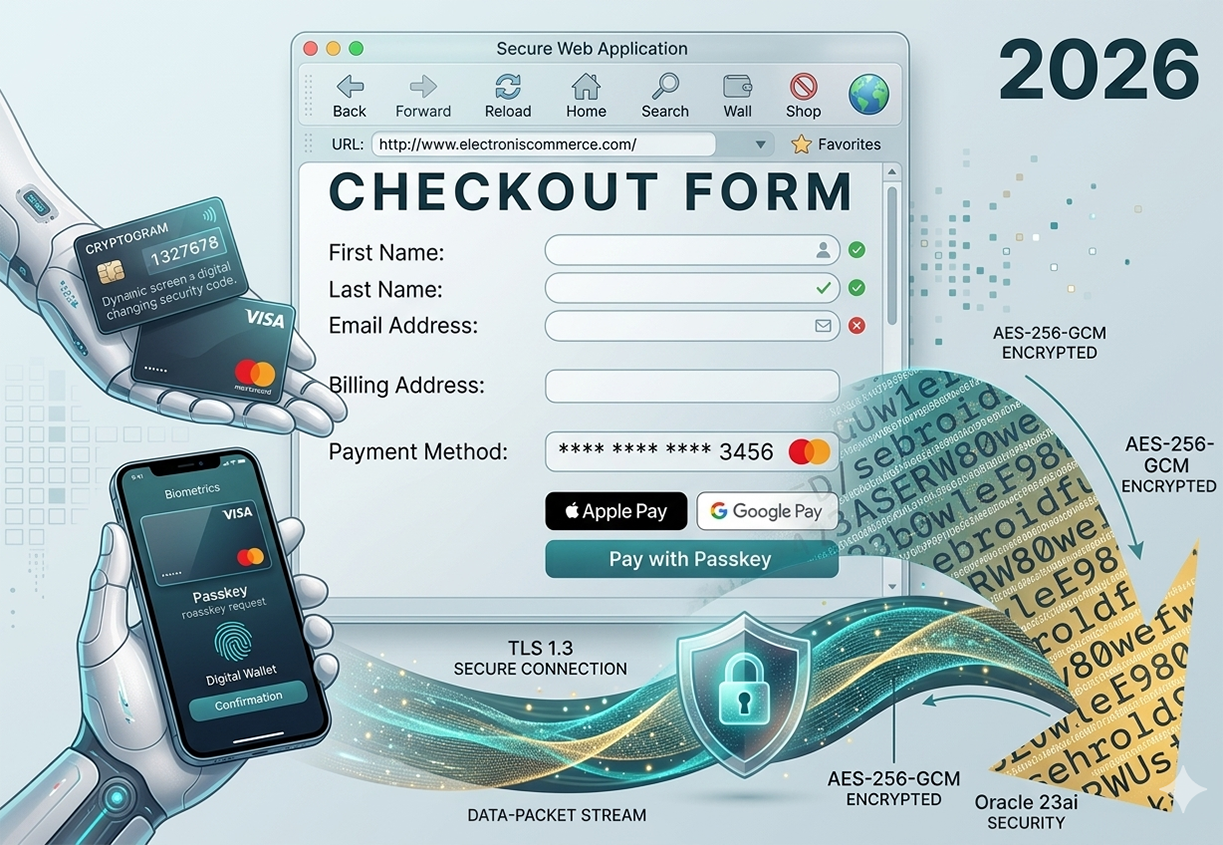
Lesson 2 identified the five security elements that every ecommerce transaction must satisfy — confidentiality, authentication, access control, data integrity, and non-repudiation. This lesson goes one level deeper: showing how confidentiality and authentication are physically implemented at the moment a customer clicks "Pay." The journey from keyboard keystroke to payment processor authorization involves encryption at multiple layers, authentication through multiple mechanisms, and a data-packet stream that is deliberately unreadable to anyone who intercepts it in transit. Figure m5-3.1 shows a complete 2026 secure checkout — every element in the image corresponds to a specific security concept that this lesson explains.
The Checkout Form as a Security Boundary — Figure m5-3.1
The checkout form is the most sensitive surface in any ecommerce system — the point at which the customer types or selects their most valuable personal and financial data. Every field in Figure m5-3.1 is a potential target: the billing address links the card to an identity, the masked card number represents a stored token, and the payment method selection initiates the authorization chain. Understanding what security mechanisms activate at this boundary — before a single byte of payment data leaves the browser — is the foundation of ecommerce security literacy.
Sending Data Over the Network
How Data Travels as Packets
When a customer interacts with a web application — typing in a form field, clicking a button, or selecting a payment method — that interaction generates data that must travel from the customer's device across the public internet to the merchant's server. The internet does not transmit data as a single continuous stream; it breaks data into discrete units called packets, each carrying a fragment of the complete message alongside routing information that tells network infrastructure where to send it. A single form submission — the checkout data in Figure m5-3.1 — might be broken into dozens of packets, each routed independently across different physical paths before being reassembled at the destination server. This packet-switched architecture is what makes the internet resilient, but it also means that each packet passes through multiple routers, switches, and network nodes that are not under the merchant's control — any one of which could be a point of interception.
Why Plain-Text Transmission Is Dangerous
In the early web, form data was transmitted exactly as the user typed it — as plain text readable by any device that intercepted the packets in transit. A credit card number entered into an early ecommerce form would travel across the network as a sequence of ASCII characters: "4111111111111111" — readable by anyone with a packet capture tool positioned anywhere along the route between the browser and the server. This is what the legacy description "the data is sent as is" referred to — and it was genuinely true of unencrypted HTTP connections. A man-in-the-middle attacker who positioned themselves between the customer and the merchant could read, copy, or modify every byte of every form field without either party knowing.
Today, any ecommerce site operating on unencrypted HTTP — without the S that indicates a TLS-secured HTTPS connection — exposes its customers to exactly this risk. Modern browsers mark HTTP sites as "Not Secure" in the address bar and block form submissions on HTTP pages by default. The label "AES-256-GCM ENCRYPTED" appearing three times in Figure m5-3.1, and the "TLS 1.3 SECURE CONNECTION" label at the bottom, indicate that this checkout operates on HTTPS — the plain-text era is specifically what these labels are designed to replace.
Today, any ecommerce site operating on unencrypted HTTP — without the S that indicates a TLS-secured HTTPS connection — exposes its customers to exactly this risk. Modern browsers mark HTTP sites as "Not Secure" in the address bar and block form submissions on HTTP pages by default. The label "AES-256-GCM ENCRYPTED" appearing three times in Figure m5-3.1, and the "TLS 1.3 SECURE CONNECTION" label at the bottom, indicate that this checkout operates on HTTPS — the plain-text era is specifically what these labels are designed to replace.
How TLS 1.3 Encrypts Data Before It Leaves the Browser
TLS 1.3 (Transport Layer Security version 1.3) is the protocol that wraps the plain-text HTTP communication in a cryptographic envelope before any data crosses the network boundary. The TLS handshake — which completes in a single round-trip under TLS 1.3, compared to two round-trips under TLS 1.2 — performs three operations simultaneously: it authenticates the server using its X.509 certificate, it negotiates the cipher suite (AES-256-GCM in the case of Figure m5-3.1), and it derives the session keys that will be used to encrypt all subsequent data. Once the handshake completes, every packet that leaves the browser is encrypted — the card number, the billing address, the form field values — transformed into the ciphertext stream visible in the right portion of Figure m5-3.1 before it enters the data-packet stream visible at the bottom. No network node between the browser and the server can read the contents of those packets; they can only route them.
Scrambling Data — AES-256-GCM Encryption
What AES-256 Does
Encryption — referred to as "scrambling" in the original ecommerce literature — is the process of transforming readable plaintext into unreadable ciphertext using a mathematical algorithm and a key. The Advanced Encryption Standard (AES) with a 256-bit key (AES-256) is the current global standard for symmetric encryption, adopted by the US National Institute of Standards and Technology and used by governments, financial institutions, and ecommerce platforms worldwide. AES-256 operates on 128-bit blocks of data, applying fourteen rounds of substitution, permutation, and mixing operations using a key derived from the session negotiation. The result is ciphertext that is computationally indistinguishable from random noise — exactly the scrambled text cloud visible in Figure m5-3.1. Without the correct 256-bit key, recovering the original plaintext from AES-256 ciphertext is computationally infeasible with current technology: a brute-force attack against AES-256 would require more time than the current age of the universe.
What GCM Mode Adds — Authenticated Encryption
AES by itself provides confidentiality — it scrambles the data so it cannot be read. But confidentiality alone does not prevent an attacker from modifying the ciphertext in transit — flipping bits in the encrypted packet without decrypting it, causing the decrypted plaintext to be subtly different from what the sender transmitted. GCM (Galois/Counter Mode) is the mode of operation that adds integrity and authentication to AES encryption, combining both properties in a single efficient operation called authenticated encryption with associated data (AEAD).
In GCM mode, AES-256 generates both a ciphertext (the encrypted data) and an authentication tag — a cryptographic MAC (Message Authentication Code) computed over the ciphertext and any additional non-encrypted metadata. The receiver verifies the authentication tag before decrypting: if the tag does not match, the packet has been tampered with and is rejected. This means AES-256-GCM provides confidentiality (the data cannot be read), integrity (any modification is detected), and authentication (the tag proves the ciphertext came from someone with the correct key) — all three security properties from a single encryption operation. This is why Figure m5-3.1 labels the encryption specifically as AES-256-GCM rather than simply AES-256: GCM mode is what makes the encryption suitable for a payment transaction where both secrecy and tamper detection are required simultaneously.
In GCM mode, AES-256 generates both a ciphertext (the encrypted data) and an authentication tag — a cryptographic MAC (Message Authentication Code) computed over the ciphertext and any additional non-encrypted metadata. The receiver verifies the authentication tag before decrypting: if the tag does not match, the packet has been tampered with and is rejected. This means AES-256-GCM provides confidentiality (the data cannot be read), integrity (any modification is detected), and authentication (the tag proves the ciphertext came from someone with the correct key) — all three security properties from a single encryption operation. This is why Figure m5-3.1 labels the encryption specifically as AES-256-GCM rather than simply AES-256: GCM mode is what makes the encryption suitable for a payment transaction where both secrecy and tamper detection are required simultaneously.
What the Ciphertext Stream Looks Like
The scrambled text visible in the right portion of Figure m5-3.1 — the cloud of characters including fragments like "BASERW80we", "3b0wleE98", "ebroidft" — represents what AES-256-GCM ciphertext looks like when rendered as printable characters. In reality, raw ciphertext is binary data (bytes with values from 0 to 255); when displayed as text it appears as a random mix of letters, numbers, and special characters with no discernible pattern. This visual representation captures exactly why encryption works: without the decryption key, an attacker who intercepts these bytes gains no information about the original plaintext. The checkout form fields that produced this ciphertext — the card number, the billing address, the customer's name — are entirely unrecoverable from the ciphertext alone.
Payment Authentication in the 2026 Checkout
EMV Cryptograms — Dynamic Security Codes
The card in Figure m5-3.1's left panel is labeled "CRYPTOGRAM 1327678" with the caption "Dynamic screen a digital changing security code." This describes an EMV cryptogram — a one-time authentication code generated by the card's embedded chip (or by the card network's token service for virtual cards) for each individual transaction. Unlike the static three-digit CVV printed on a physical card, an EMV cryptogram is mathematically derived from the specific transaction details — the amount, the merchant identifier, a transaction counter, and a random number — using a key stored in the card's secure element. The resulting cryptogram is unique to that transaction and cannot be reused.
This dynamic nature is what prevents replay attacks: if an attacker intercepts a transaction's cryptogram, they cannot use it to authorize a second transaction — the cryptogram is already spent. The "dynamic screen" reference describes cards with e-ink displays that show a changing CVV code (a dynamic CVV or dCVV) that refreshes every 30-60 seconds, providing the same one-time-use property for card-not-present transactions where the chip cannot generate an EMV cryptogram directly.
This dynamic nature is what prevents replay attacks: if an attacker intercepts a transaction's cryptogram, they cannot use it to authorize a second transaction — the cryptogram is already spent. The "dynamic screen" reference describes cards with e-ink displays that show a changing CVV code (a dynamic CVV or dCVV) that refreshes every 30-60 seconds, providing the same one-time-use property for card-not-present transactions where the chip cannot generate an EMV cryptogram directly.
Passkeys — FIDO2/WebAuthn at the Point of Payment
The "Pay with Passkey" button in Figure m5-3.1 represents the most significant shift in ecommerce authentication since the introduction of SSL. A passkey is a FIDO2/WebAuthn credential — a device-bound cryptographic key pair where the private key never leaves the customer's device. When a customer registers a passkey with a merchant, the device generates a key pair: the private key is stored in the device's secure enclave (a hardware security module built into modern smartphones and laptops), and the public key is registered with the merchant's server. At payment time, the merchant sends a cryptographic challenge; the device signs the challenge with the private key after verifying the customer's identity through biometrics (fingerprint or face recognition) or device PIN.
The security properties of passkeys address the primary weaknesses of password-based authentication simultaneously. Passkeys cannot be phished — the key pair is bound to the specific merchant's domain, so a phishing site on a different domain cannot request a signature from the passkey. Passkeys cannot be credential-stuffed — there is no shared secret stored on the server that can be stolen in a database breach; the server stores only the public key, which is useless to an attacker without the corresponding private key. Passkeys cannot be intercepted in transit — the private key never leaves the device. The smartphone in Figure m5-3.1 shows exactly this flow: biometrics → passkey request → fingerprint verification → digital wallet confirmation.
The security properties of passkeys address the primary weaknesses of password-based authentication simultaneously. Passkeys cannot be phished — the key pair is bound to the specific merchant's domain, so a phishing site on a different domain cannot request a signature from the passkey. Passkeys cannot be credential-stuffed — there is no shared secret stored on the server that can be stolen in a database breach; the server stores only the public key, which is useless to an attacker without the corresponding private key. Passkeys cannot be intercepted in transit — the private key never leaves the device. The smartphone in Figure m5-3.1 shows exactly this flow: biometrics → passkey request → fingerprint verification → digital wallet confirmation.
Digital Wallets — Apple Pay and Google Pay Tokenization
Figure m5-3.1 shows Apple Pay and Google Pay as payment options alongside the passkey button. Both implement network tokenization — a security mechanism that substitutes the customer's actual card number with a payment network token (a Device Primary Account Number, or DPAN) that is valid only for transactions from that specific device with that specific merchant. When a customer adds a card to Apple Pay or Google Pay, the card network generates a DPAN and provisions it to the device's secure element. At checkout, the digital wallet presents the DPAN — not the real card number — to the merchant's payment gateway.
The security consequence is significant: even if the merchant's payment system is breached, the attacker obtains only DPANs — tokens that cannot be used on other devices or with other merchants, and that can be individually revoked without the customer needing to replace their physical card. The real card number (the Funding Primary Account Number, or FPAN) never reaches the merchant's system. Combined with the biometric authentication that unlocks the digital wallet before the token is presented, Apple Pay and Google Pay provide stronger security guarantees than a manually entered card number protected only by CVV.
The security consequence is significant: even if the merchant's payment system is breached, the attacker obtains only DPANs — tokens that cannot be used on other devices or with other merchants, and that can be individually revoked without the customer needing to replace their physical card. The real card number (the Funding Primary Account Number, or FPAN) never reaches the merchant's system. Combined with the biometric authentication that unlocks the digital wallet before the token is presented, Apple Pay and Google Pay provide stronger security guarantees than a manually entered card number protected only by CVV.
Form Validation — Client-Side vs Server-Side
What the Green Checkmarks and Red X Mean
The checkout form in Figure m5-3.1 shows validation indicators on three fields: green checkmarks on First Name and Last Name indicate those fields have passed validation; a red X on Email Address indicates a validation failure — the entered value does not match the expected format for an email address. These indicators are the visible output of client-side validation — JavaScript running in the browser that checks form field values before the form is submitted to the server. Client-side validation improves user experience by providing immediate feedback: the customer learns their email address is malformed before clicking "Pay," rather than receiving an error after a round-trip to the server.
Why Server-Side Validation Is the Security Boundary
Client-side validation is a user experience feature, not a security control. A technically capable attacker can bypass client-side JavaScript entirely — submitting arbitrary data directly to the server's API endpoint using tools like curl or Postman, completely circumventing the browser's validation logic. Server-side validation — validation performed by the merchant's server after receiving the submitted data — is the actual security boundary. Every input that the server receives from a form submission must be validated, sanitized, and type-checked on the server regardless of what client-side validation has already performed.
The security consequences of failing to validate server-side include SQL injection (malformed input that manipulates database queries), cross-site scripting (XSS — malicious JavaScript injected through form fields and stored in the database), and business logic bypass (submitting negative quantities, zero-value prices, or invalid discount codes that the client-side form would have rejected). Modern ecommerce platforms — Shopify, WooCommerce, BigCommerce, Magento 2 — enforce server-side validation for all payment-related inputs as a platform requirement. Headless commerce implementations (Commerce.js, Saleor) and JAMstack ecommerce (Next.js Commerce, Gatsby Store) must implement server-side validation explicitly in their API layer, since the platform's built-in validation is no longer the enforcement point when the frontend is decoupled from the backend.
The security consequences of failing to validate server-side include SQL injection (malformed input that manipulates database queries), cross-site scripting (XSS — malicious JavaScript injected through form fields and stored in the database), and business logic bypass (submitting negative quantities, zero-value prices, or invalid discount codes that the client-side form would have rejected). Modern ecommerce platforms — Shopify, WooCommerce, BigCommerce, Magento 2 — enforce server-side validation for all payment-related inputs as a platform requirement. Headless commerce implementations (Commerce.js, Saleor) and JAMstack ecommerce (Next.js Commerce, Gatsby Store) must implement server-side validation explicitly in their API layer, since the platform's built-in validation is no longer the enforcement point when the frontend is decoupled from the backend.
SET — Secure Electronic Transactions in Historical Context
The Secure Electronic Transactions (SET) protocol — jointly issued by Visa and Mastercard in 1996 — was the payment industry's first systematic attempt to provide a cryptographic framework for credit card transactions over the internet. SET addressed the credit card theft problem that had reached significant scale in early ecommerce by specifying how to use public-key cryptography, digital certificates, and dual-signature verification to protect card transactions on open networks. SET required digital certificates for cardholders, merchants, and payment gateways — a three-party cryptographic trust model that was technically sophisticated but operationally complex.
SET was ultimately not widely adopted: the requirement for cardholders to install digital certificates on their computers proved too high a barrier for mass-market B2C ecommerce. SSL/TLS — which required no client-side software beyond a standard browser — achieved the same confidentiality goal with far less friction and became the dominant standard. SET's core concepts — dual-signature verification, the separation of payment credentials from order information, and the role of certificate authorities in establishing trust — survived and are reflected in modern protocols including EMV 3D Secure and the FIDO2/WebAuthn passkey architecture. Understanding SET's design is useful context for understanding why today's authentication systems are structured as they are.
SET was ultimately not widely adopted: the requirement for cardholders to install digital certificates on their computers proved too high a barrier for mass-market B2C ecommerce. SSL/TLS — which required no client-side software beyond a standard browser — achieved the same confidentiality goal with far less friction and became the dominant standard. SET's core concepts — dual-signature verification, the separation of payment credentials from order information, and the role of certificate authorities in establishing trust — survived and are reflected in modern protocols including EMV 3D Secure and the FIDO2/WebAuthn passkey architecture. Understanding SET's design is useful context for understanding why today's authentication systems are structured as they are.
In the next lesson, you will learn about authentication and certification.